I Dumped the Strings Out of the Claude Code Binary, and Then I Built a Tool
I built this because I had a notes file that got embarrassing.
About six months into using Claude Code for real client work, I started keeping a private text file of environment variables and settings.json keys I had bumped into while debugging something. Half the time the variable was not in the official docs. Half the time I had found it by searching the wider Claude Code ecosystem, or by reading a tweet, or by tailing logs and seeing a config name flash by during startup. The notes file got to about 80 entries. Then 90. Then I admitted it was a tool, not a notes file.
So I ran strings against the Claude Code binary on my Mac.
The output had 434 environment variables in it.
That number broke my brain a little. The official /config UI shows roughly a dozen settings. The Anthropic docs site documents a few dozen more. The binary itself, the thing I run every day, has 434 environment variables compiled into it that the program references by name. That is the actual configuration surface of Claude Code.
So I built cccfg. It is on PyPI today: pip install cccfg.
This is the story of how I built it, what is in it, and why I think every team running Claude Code on production codebases should have it on their machines.
What `/config` Shows You, And What It Does Not
Run /config inside Claude Code. You will see a friendly UI with about a dozen common settings. The model picker. Theme. A handful of permissions toggles. The kind of stuff you would expect.
What you do not see:
- The 434 environment variables that govern everything from API caching to MCP output limits to managed enterprise lockdown to legacy model remapping to the 23 different
DISABLE_*toggles that control specific behaviors. - The settings.json keys that compliance teams actually care about, like
strictPluginOnlyCustomizationand theallowManaged*family. - The
--bareflag that gives you a deterministic Claude Code run with no harness baggage, useful for CI and the only mode that strictly requiresANTHROPIC_API_KEY. - The full set of hook events you can attach automation to, in particular the ones that are not in the docs but absolutely fire.
- The slash commands that exist but are not always advertised in the UI.
I do not think Anthropic is hiding anything. The team has been deliberate about keeping /config small. That is the right call for a product that 99% of users use the way 99% of users use it. The cost is that the remaining 1% of usage, the part that I get paid for in client engagements, has no good surface.
The full surface is in the binary. The binary is on every machine that runs Claude Code. The list is extractable. So I extracted it.
The Extraction
For anyone who has not done this before, the process is unglamorous.
strings is a Unix utility from the 1970s. It reads a binary file and prints every run of printable ASCII characters longer than a threshold (usually 4 characters). Most of the output is noise: compiler artifacts, library symbol names, internal function names, stack trace formats. A small portion of the output is what you actually want, which is the named constants the program references in its own source code.
The trick is to filter the noise. For Claude Code, the patterns that actually mean something are:
CLAUDE_CODE_*for the main env vars. 243 matches.CLAUDE_*for older env vars. 66 additional matches.ANTHROPIC_*for org-wide env vars. 46 matches.DISABLE_*for toggles. 23 matches.BASH_*,MCP_*,MAX_*for category-specific vars. Dozens more./[a-z]+for slash commands.- Capital-case event names like
PreToolUse,SessionStart,Stopfor hook events.
Filter, dedupe, count. The result is 499 entries when you also include the settings.json keys I had hand-collected. 434 env vars, 30 settings.json keys, 14 CLI flags, 11 slash commands, 10 hook events.
For each entry, I added a description, a use case, an example value, and a documented default if I knew one. The first hundred or so got hand-written from my own deployment notes. The rest got auto-categorized by naming pattern with a short summary derived from the name. The discovered ones carry a "Discovered" tag in the tool, so you can tell which are documented and which are not.
That tag is the design decision I am most happy about. It is honest. Documented entries have Anthropic's commitment behind them. Discovered ones are real but undocumented and could change between versions. Treat them accordingly.
What the Tool Does
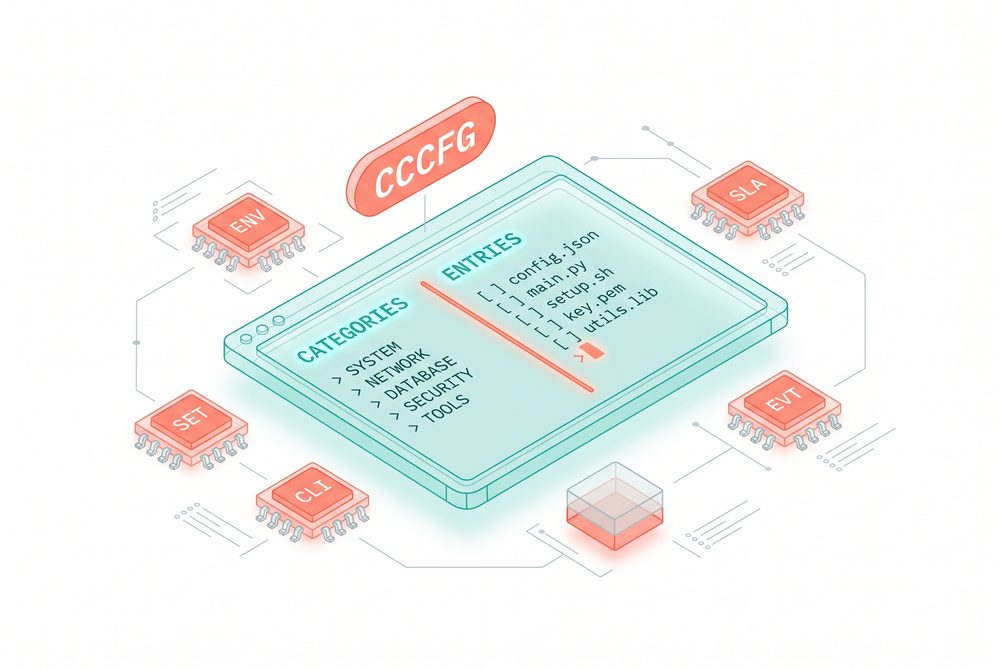
cccfg is a small TUI. Two-column layout, keyboard-driven.
jandkto navigate./to search across name, summary, description, use case, and category.cto jump to the category list.Enterto open the manual page for an entry.?for the cookbook.qto quit.
The manual page is where most of the value lives. It leads with the current value on this machine. For env vars, that comes from your os.environ. For settings.json keys, it reads ~/.claude/settings.json directly. Then summary, description, use case, example, default, and an exact snippet you can copy.
The question I get most often when I show people this tool is not "what does setting X do" but "what is setting X set to on this machine right now". The live current-value lookup answers that without leaving the keyboard.
In-Place Editing With Atomic Writes
For settings.json keys, the manual page also accepts an e keystroke. That opens an edit modal pre-filled with the current value. You type a new value, press Ctrl+S, and the tool writes the change to ~/.claude/settings.json.
What actually happens on save:
- A backup is written to
~/.claude/settings.json.bak. - The new content is written to a temp file.
- The temp file is atomically renamed to
~/.claude/settings.json.
The atomic rename means a crash during the write cannot leave you with a half-written settings file. The backup means you can always recover the previous version. I would not ship a tool that edits a config file my daily work depends on without both of those.
d deletes a key entirely. Same atomic write, same backup.
For env vars and CLI flags, the edit key shows a hint instead. Direct file rewriting of a shell config from a TUI is a bad idea. The right place to set those is your shell or your settings.json env block.
Five Recipes I Reach For Most Often
The cookbook in the tool has more. These are the five I run into in client work every week.
Lock down a team's install. Five settings in your managed settings file. allowManagedHooksOnly, allowManagedMcpServersOnly, allowManagedPermissionRulesOnly, disableBypassPermissionsMode, and strictPluginOnlyCustomization: ["skills", "hooks"]. The first three pin all user-level customizations to org-approved sources. The fourth blocks --dangerously-skip-permissions even when the user passes it. The fifth says skills and hooks may only come from managed sources. Full lockdown in five lines.
Maximum privacy mode. Five env vars. DISABLE_TELEMETRY=1, DISABLE_ERROR_REPORTING=1, DISABLE_GROWTHBOOK=1, CLAUDE_CODE_DISABLE_FEEDBACK_SURVEY=1, CLAUDE_CODE_DISABLE_NONESSENTIAL_TRAFFIC=1. The last one is the strict one. It blocks all non-essential outbound traffic. The combination is what regulated or air-gapped environments need.
Vault-backed auth. Set apiKeyHelper in settings.json to a script that prints your API key on stdout. The script can call 1Password CLI, HashiCorp Vault, AWS Secrets Manager. Then tune CLAUDE_CODE_API_KEY_HELPER_TTL_MS for how long the result gets cached. The end result is no API keys in dotfiles, no keys in environment dumps, no keys in process listings. Every security team I have worked with asks for this. Most have never been shown that it exists.
CI-clean run. claude --bare skips hooks, LSP, plugin sync, attribution, auto-memory, background prefetches, keychain reads, and CLAUDE.md auto-discovery. Auth becomes strictly ANTHROPIC_API_KEY or apiKeyHelper. Deterministic, fast, no harness baggage. This flag is in the binary. It is in the catalog. I have rolled it out at three clients in the last three months.
Bigger Bash outputs. BASH_DEFAULT_TIMEOUT_MS=300000, BASH_MAX_TIMEOUT_MS=900000, BASH_MAX_OUTPUT_LENGTH=500000. Defaults are conservative for safety. If you run long migrations, large test suites, or anything where you want Claude to actually see the full output instead of a truncated tail, raise them.
CLI Modes for the Scripters
The TUI is the headline. For people who live in scripts and CI, there are headless modes too:
`` cccfg --list # full catalog, grouped by category cccfg --search hooks # search across all entries cccfg --category Models # filter by category cccfg --kind settings # only settings.json keys cccfg --kind env # only env vars cccfg --json | jq # pipe-friendly JSON dump cccfg --cookbook # the cookbook the TUI shows ``
The --json mode is the one that scales for teams. The four use cases I have hit so far in client work: pre-flight checks in CI (what env vars does my build expose that could affect Claude), documentation generation for an internal rollout, drift detection between developer machines (cccfg --json | hash, compare), and audit logs for which settings.json keys got overridden on which developer's box.
The drift detection one has saved me twice on "works on my machine" reports. Two developers, same code, different behavior, and the difference turned out to be MAX_MCP_OUTPUT_TOKENS set on one machine and not the other from an earlier experiment that never got cleaned up.
Why I Built This
The honest reason. I was tired of grepping my own notes file. I was tired of every client engagement starting with "do you know what these five settings do" and me saying "let me find my notes". I was tired of compliance reviews asking for the full list and me having to produce it from memory and a search of the Claude Code repo.
The less honest reason. I think the gap between what Claude Code can actually be configured to do and what is visible in the official UI is the gap that produces most of the bad rollouts I see at clients. Teams adopt Claude Code, hit a wall on a compliance question, give up, conclude that Claude Code "is not enterprise ready". It is enterprise ready. The settings exist. They are just not in /config.
cccfg is small. Two Python files plus a data file. The catalog is data-driven so the tool stays small as the catalog grows. The whole thing is under MIT. If you find a setting in your day-to-day that is not in the catalog, open an issue. The auto-discovered entries are easy. The hand-written descriptions are where the value compounds, and those grow as people contribute deployment notes from their own environments.
What I Want From You
If you run Claude Code more than a few hours a week:
`` pip install cccfg cccfg ``
Spend ten minutes in it. Walk the categories. Open the manual page on a few entries you have never seen. See what is set on your machine versus the defaults.
Then tell me what you find. Reply to this email. I am collecting the patterns. The next version of the catalog gets better when more people open it.
The tool ships with my Claude Code book. The book is full of patterns like this: the harness lessons, the model selection, the agent-building, the production case. Every one of those depends on knowing which knob to turn when. cccfg is the catalog of knobs.
pip install cccfg. Two-line install. 499 settings on the other side.
Tool: https://pypi.org/project/cccfg/