AI Engineering Workflows That Hold Up
Three tracks, eighteen lessons, real diagrams, Q&A, and quizzes. By the end you will have a working mental model for how the Claude Code harness fits together, where specs belong, and how to roll it out to a team. Save the course and come back to it whenever a teammate asks "how should we set this up?"
The Claude Code Harness
Six layers around the model plus subagents as delegation. The harness matters more than the model, and the build order matters too.
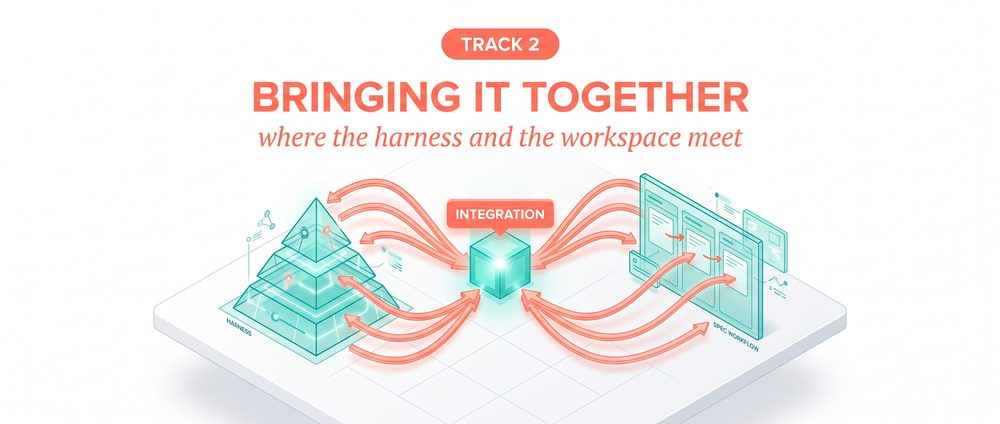
Bringing It Together
Where the harness meets the spec workflow. The 30-day adoption plan, failure diagnostics, and a day-one onboarding flow.
Where Specs Belong
Why spec.md drifts, the two-snapshot pattern, the workspace-authored / files-generated rule. The architecture that holds up.
How to use this course
Lessons are short and self-contained. Each one has a body, a diagram, an expanded explainer, a Q&A, and a 3-question quiz so you can self-check before moving on. The sidebar tracks what you have finished. Progress is saved in your browser.
You can read the tracks in order or jump around. Track 1 (the harness) is the foundation. Track 2 (bringing it together) assumes Track 1. Track 3 (specs) is independent but lands harder after the harness is understood.
Marco Kotrotsos, 30 years of IT experience now focused on practical AI deployment. The course is curated from the Autocomplete publication on Medium and Substack, with the harness content annotated from Anthropic's May 14 2026 guide and supporting docs.
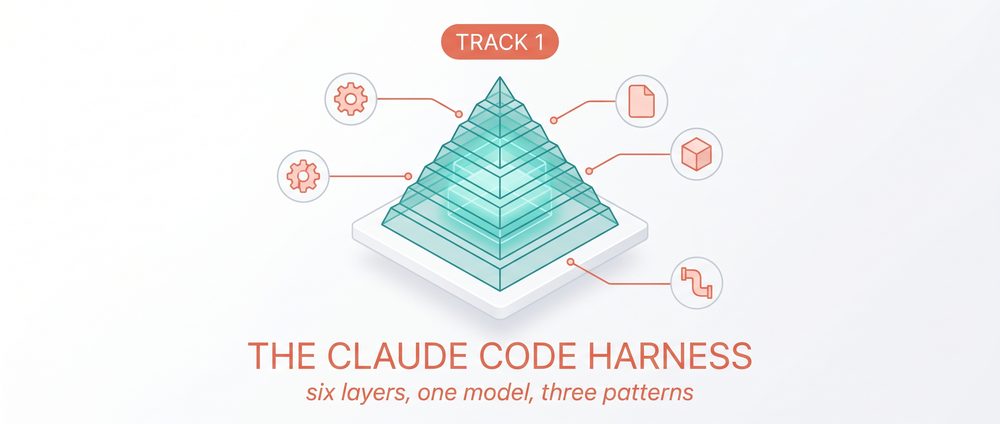
Why the harness matters more than the model
Anthropic's May 14 guide contains one sentence that carries the whole argument.
- What the harness actually is
- Why model benchmarks alone are the wrong lens
- The seven components: six extension points plus one delegation capability
Anthropic dropped a substantial guide on May 14 called "How Claude Code works in large codebases." The central claim is one sentence:
The capabilities of Claude Code are the capabilities of the model plus the harness wrapped around it. Six extension points and one delegation capability. The model is one of seven things.
The wrong knob
Teams that fixate on model benchmarks are tuning the wrong knob. The benchmark differences between current frontier models are real but small. The differences in harness quality between teams are massive. Two teams running the same model can finish ten times the work apart because one has a configured harness and the other is fighting against it.
The seven components
Six extension points (build in this order):
- CLAUDE.md files (context that loads every session)
- Hooks (scripts triggered by events)
- Skills (packaged expertise loaded on demand)
- Plugins (bundles of the above, distributable)
- LSP integrations (symbol-level code intelligence)
- MCP servers (connections to external tools and data)
Plus one delegation capability: subagents (isolated Claude instances with their own context).
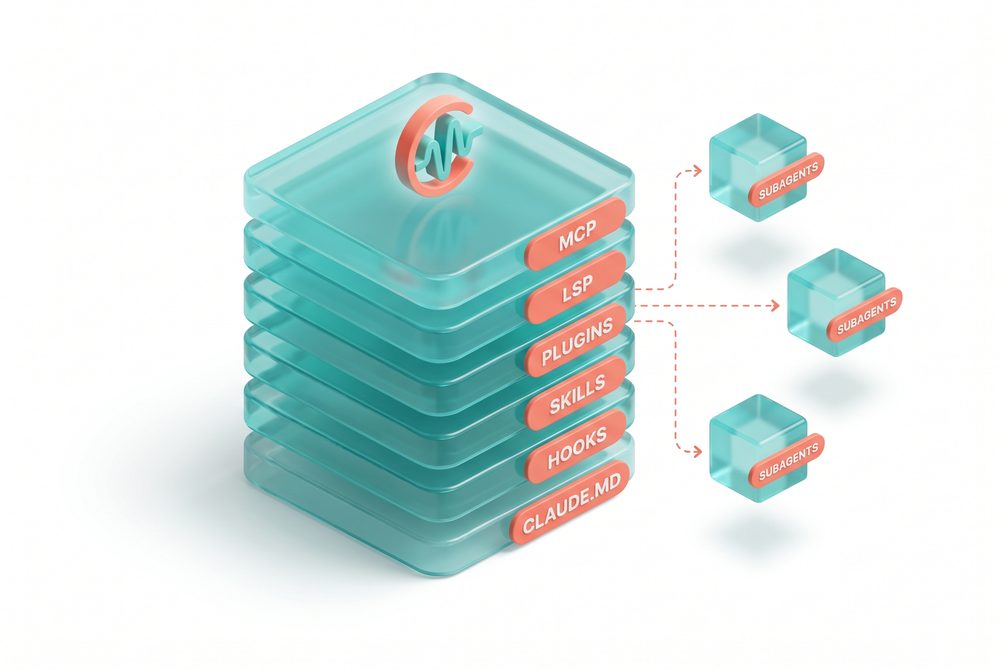
The six harness layers do not make the model smarter. They give the model a working environment that compounds: a place to remember conventions, a way to react to events, packaged expertise it can pull on demand, distribution so the whole team shares the same setup, symbol-level navigation, and connections to the systems where real work lives. A frontier model with none of that is a graduate engineer dropped into a codebase with no onboarding. A mid-tier model with all of it is a senior engineer with two years of tenure.
Rakuten reported 79% reduced time to market (24 days to 5 days). Stripe shipped a 10,000-line Scala-to-Java migration in 4 days that they estimated at 10 engineer-weeks manually. Wiz did a 50,000-line Python-to-Go migration in ~20 hours of active development versus an estimated 2-3 months manually.
Source: claude.com/product/claude-code/enterprise
Q&A
Quick quiz
Key takeaways
- Performance at scale is determined by the harness, not the model.
- Six extension points plus subagents as delegation. The model is one of seven things.
- Teams that focus on model benchmarks alone are tuning the wrong knob.
Agentic search vs RAG
Why Claude Code does not embed your codebase, and the tradeoff that creates.
- Why RAG-based code tools fail at scale
- How agentic search works (grep, file traversal, follow references)
- The starting-context tradeoff and how to mitigate it
The RAG failure mode
A RAG-powered AI coding tool embeds the entire codebase ahead of time and retrieves relevant chunks at query time. At small scale this is fine. At large scale it breaks, because the embedding pipeline cannot keep up with active engineering teams committing code. The index reflects the codebase as it existed days or weeks ago. Retrieval returns a function the team renamed two weeks ago. The build fails.
How agentic search works
Claude traverses the file system, reads files, runs grep, follows references. No index. No staleness window. Every query operates on what is true right now.
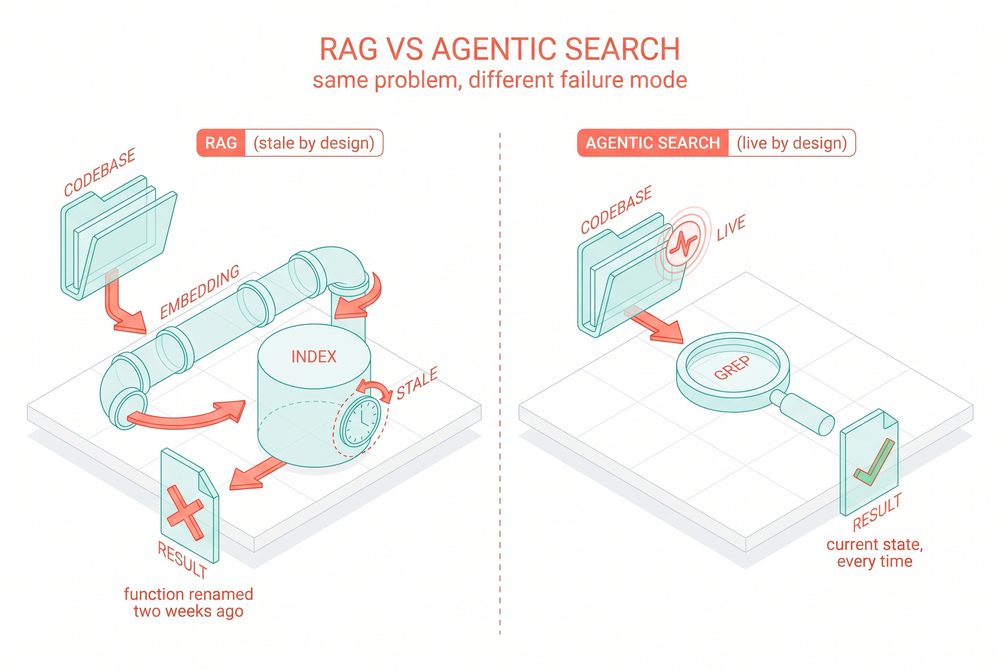
The reason RAG staleness is fatal in code but tolerable in document search is that code has reference integrity that documents do not. A document with a slightly outdated paragraph is still useful. A function reference pointing to a renamed symbol breaks the build. Code is unforgiving about staleness in a way that prose never is, which is why retrieval-based architectures hit a wall the moment teams scale past a few engineers committing concurrently.
Q&A
Quick quiz
Key takeaways
- RAG embeddings get stale; at scale they cannot keep up with commits.
- Agentic search uses grep and file traversal against the live codebase. No staleness.
- The tradeoff is that agentic search needs good starting context. The harness is how you provide it.
CLAUDE.md (lean, layered, audited)
The foundation layer. Get this right or nothing else works.
- The three operational rules for CLAUDE.md
- How directory-tree loading works
- The most common pathology: skill-shaped content in CLAUDE.md
CLAUDE.md files are the foundation. Nothing else has anywhere to live until these are right.
The inverse pattern is common: every convention, every style rule, every "do not do this" rule gets piled into a single root CLAUDE.md that grows to 2,000 lines over six weeks. Claude tries to honor all of it, runs out of context space, and the team blames the model.
Three operational rules
Lean. The root CLAUDE.md should fit on one screen. Pointers, critical gotchas, and the highest-leverage conventions only. If the root file is more than 80 lines, it is doing too much.
Layered. Claude walks up the directory tree and loads every CLAUDE.md file it finds along the way. A CLAUDE.md in src/payments/ loads automatically when Claude is working in that directory. Put module-specific conventions in module-specific files.
Audited. Anthropic recommends reviewing CLAUDE.md every three to six months. Tighter rule: audit after every major model release.
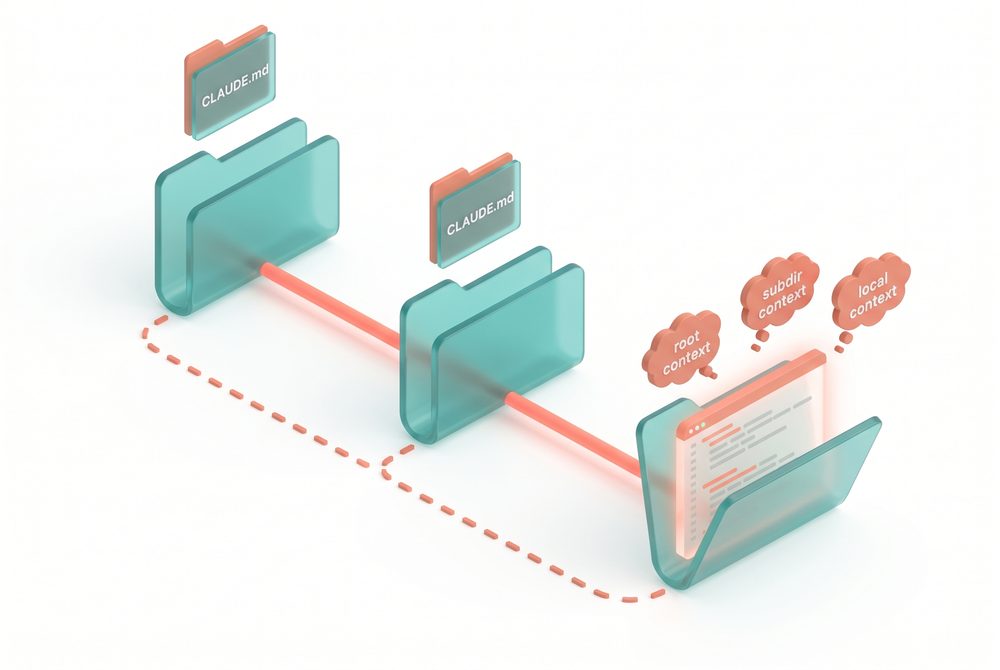
The directory-tree loading mechanic is the most underused property of CLAUDE.md, and it is the one that solves the bloat problem mechanically rather than through discipline. When Claude is editing a file in src/payments/processors/stripe.ts, it reads every CLAUDE.md from root down through that path, in order, with later ones layered on top. That means the conventions for the payments module never need to appear in the root file. They live where the work happens. Teams that learn to write subdirectory CLAUDE.md files first, and only promote a convention to the root when it genuinely applies everywhere, end up with foundations that stay lean for years.
"For each line, ask: would removing this cause Claude to make mistakes? If not, cut it. Bloated CLAUDE.md files cause Claude to ignore your actual instructions."
The docs also flag four file locations: ~/.claude/CLAUDE.md (global to you), ./CLAUDE.md (team, in git), ./CLAUDE.local.md (personal, gitignored), and parent/child directory files for monorepos.
Source: code.claude.com/docs/en/best-practices
Q&A
Quick quiz
Key takeaways
- Root CLAUDE.md should fit on one screen. If it is more than 80 lines, it is doing too much.
- Subdirectory CLAUDE.md files load automatically when Claude is working in that subtree.
- Any "when doing X, do Y" chunk in CLAUDE.md is probably a skill in disguise. Move it.
Hooks for continuous improvement
Hooks have two uses. The obvious one is guardrails. The valuable one is continuous improvement.
- Why hooks are best understood as a feedback layer, not a constraint layer
- Three hook patterns worth implementing in your first week
- When to use a hook instead of a CLAUDE.md instruction
The default use of hooks is guardrails: block destructive commands, prevent commits to main. That is the boring use.
The valuable use is continuous improvement. A stop hook can reflect on what happened during a session and propose CLAUDE.md updates while context is fresh. A start hook can load team-specific context dynamically so every developer gets the right setup without manual configuration.
Three patterns worth implementing
The reflection hook. At session end, ask the agent to summarize what was learned and propose updates. After two weeks of running this in a client deployment, the typical backlog is five to ten proposed CLAUDE.md changes worth reviewing.
The dynamic context hook. At session start, detect which module the developer is working in and load the relevant skills. Replaces "every developer configures manually" with "the environment knows itself."
The enforcement hook. For deterministic checks like linting and formatting, hooks beat instructions. Telling Claude to run the linter and Claude forgets 15% of the time means that 15% is your bug rate. A hook running unconditionally is 100% reliable.
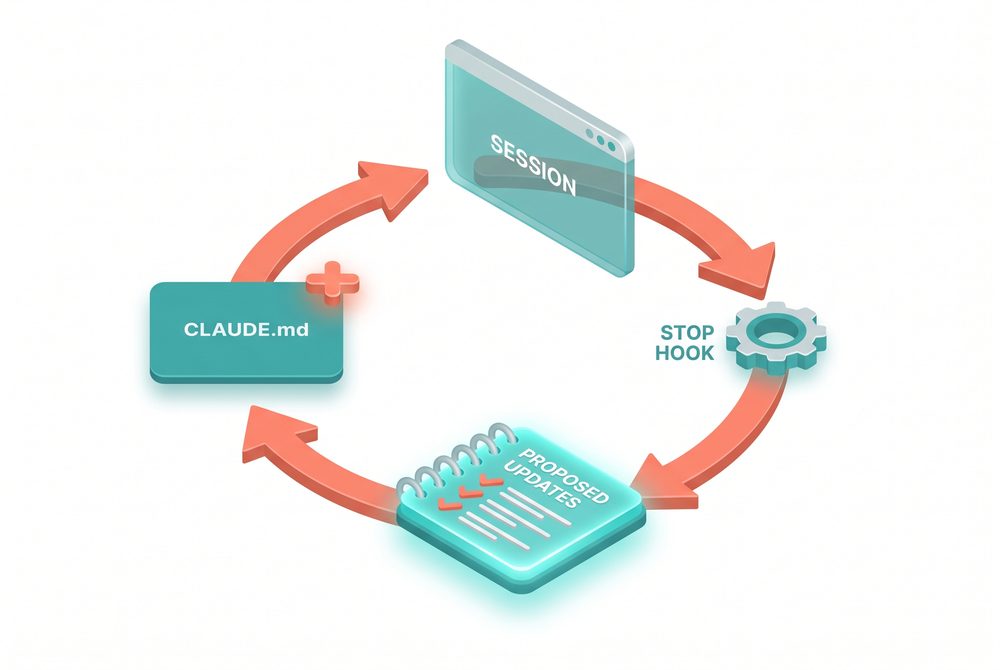
The instinct to use hooks as guardrails is so strong because guardrails are what every other engineering tool's "hook" concept is for: pre-commit blockers, CI gates, lint enforcement. Carrying that mental model into Claude Code makes the reflection use case invisible, which is unfortunate because the reflection use case is where most of the value sits. A stop hook that produces a short writeup of "what we learned this session and what should change in CLAUDE.md" is a feedback loop the rest of your toolchain does not have.
The Hooks docs specify six events: SessionStart, UserPromptSubmit, PreToolUse, PostToolUse, Stop, and Notification. Each has a deterministic guarantee that CLAUDE.md instructions do not have. "Unlike CLAUDE.md instructions, which are advisory, hooks are deterministic and guarantee the action happens."
Exit code semantics matter: exit 0 = success, exit 2 = blocking error with stderr shown to Claude, other non-zero = non-blocking error in transcript. The hook deciding whether to block tool use returns a JSON decision (allow, deny, ask, defer).
Source: code.claude.com/docs/en/hooks
Q&A
Quick quiz
Key takeaways
- The valuable use of hooks is continuous improvement, not constraint enforcement.
- Three first-week patterns: reflection, dynamic context, enforcement.
- Deterministic checks belong in hooks, not in CLAUDE.md.
Skills, plugins, LSP, MCP
The four middle layers, what each one does, and the most common mistake with each.
- How progressive disclosure works in skills
- Why plugins prevent tribal knowledge
- When LSP is the single highest-leverage configuration change
- Why MCP belongs last in the build order
Skills: progressive disclosure
Skills load on demand. A security review skill loads when Claude is assessing code for vulnerabilities. A deployment skill bound to the payments service directory only auto-loads when work is in that directory.
Common mistake: loading everything into CLAUDE.md instead of building skills.
Plugins: distribute what works
Plugins bundle skills, hooks, and MCP configurations into a single installable package. Without plugins, good setups stay tribal. One engineer figures out a great configuration, the team next door rebuilds the same thing six months later, the second team's version is slightly worse.
Common mistake: trying to centrally author every plugin from one team. The pattern that works is letting teams build their own, with central curation.
LSP: symbol-level navigation
For C, C++, Java, C#, Go, and Rust codebases especially, LSP is the single highest-leverage configuration change. Without it, grep returns dozens of matches across languages and stale branches. With it, the language server returns only the references that point to the same symbol.
Common mistake: assuming LSP is automatic. It is not. The plugin layer activates it.
MCP servers: external tools, last in line
MCP is how Claude connects to internal tools, data sources, and APIs. Common MCPs: Notion for product docs, Linear for tickets, an internal search MCP for code search at scale.
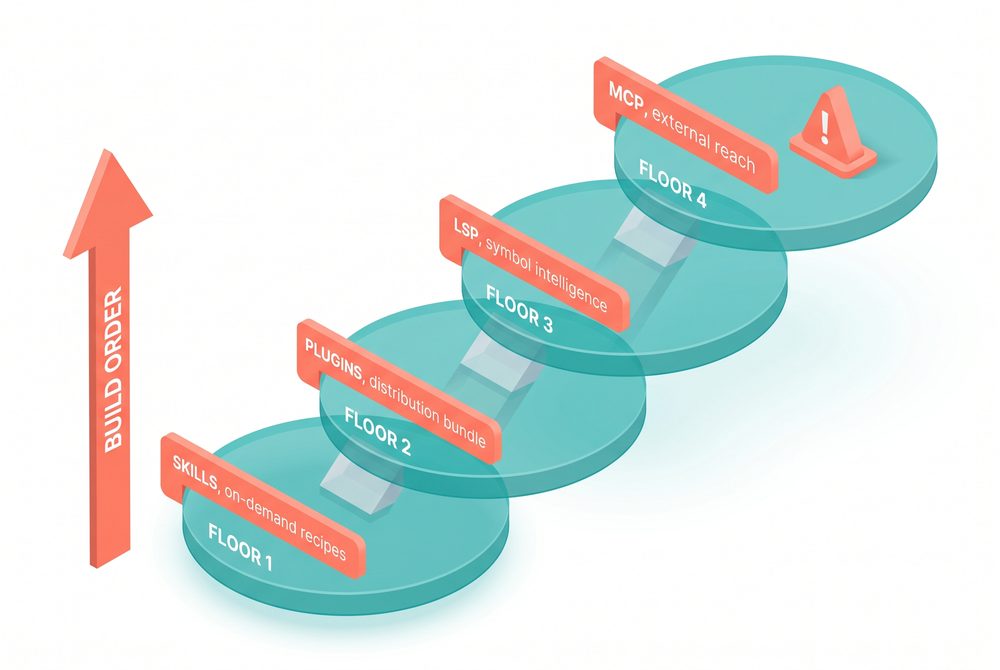
Progressive disclosure is the design property that makes skills work as a layer. A skill is a file with a short description Claude sees, and a body that loads only when the description matches what Claude is trying to do. That two-step structure keeps the always-loaded context budget free for things that genuinely apply to every session. Without progressive disclosure, every skill would be paying a context tax all the time, and the layer would collapse back into CLAUDE.md by another name.
Skills compaction budget. Skills enter a conversation as a single message and stay for the session. After auto-compaction, Claude Code re-attaches the most recent invocation of each skill, keeping the first 5,000 tokens. Re-attached skills share a combined budget of 25,000 tokens.
Skill listing budget. "The budget scales at 1% of the model's context window." Tune with skillListingBudgetFraction. Run /doctor to inspect.
Plugins. Manifest at .claude-plugin/plugin.json. If version is omitted, every commit counts as a new version. Two public marketplaces: claude-plugins-official and claude-community.
MCP transports. HTTP recommended for remote, stdio for local processes, SSE deprecated. Channels capability lets servers push messages into a session.
Sources: code.claude.com/docs/en/skills, /plugins, /mcp
Q&A
Quick quiz
Key takeaways
- Skills load on demand. Move "when doing X, do Y" content from CLAUDE.md into skills.
- Plugins distribute what works and prevent tribal knowledge from re-emerging.
- LSP is the highest-leverage change for typed-language codebases.
- MCP is the last layer. Build the others first.
Subagents and delegation
Not a configured layer. A delegation capability you can reach for anytime.
- How subagents differ from the six configured layers
- The split-exploration-from-editing pattern
- Parallel exploration and specialized review patterns
Subagents work differently from the six layers. They are a delegation capability, available whenever you need them, configured nowhere upfront.
The pattern Anthropic flags is "split exploration from editing." Spin up a read-only subagent to map a subsystem and write findings to a file. Then have the main agent edit with the full picture. The subagent burns its own context window without polluting the editor agent's.
Two more patterns
Parallel exploration. Three subagents map three different subsystems in parallel. The main agent gets three small writeups instead of trying to read all three subsystems itself.
Specialized review. A subagent with a security-review skill reviews a change before the main agent commits. Findings come back as a file.
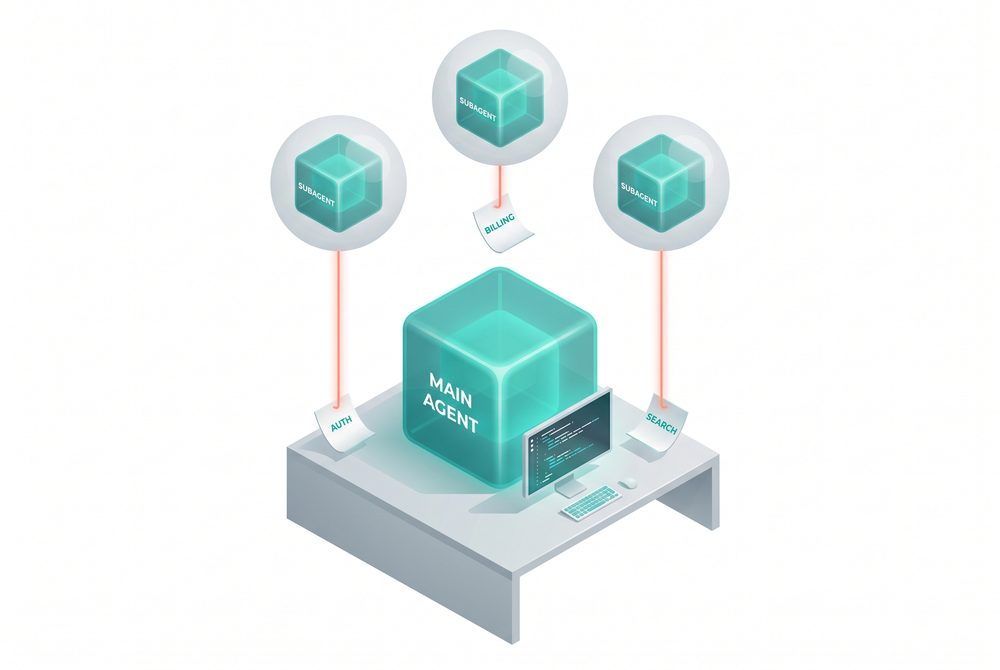
The intuition to internalize about subagents is that context is a non-renewable resource within a single conversation. Every file the agent opens, every search it runs, every system map it builds stays loaded until the conversation ends. By the time the agent is ready to make the actual change, half its context might be exploration scaffolding that no longer carries new information. A subagent inverts this: it does the same exploration in an isolated context, writes a short summary to disk, and disappears. The main conversation gets the summary, not the scaffolding.
Three built-in subagents: Explore (Haiku, read-only, used for codebase search), Plan (inherits model, read-only, used during plan mode to prevent infinite nesting), general-purpose (all tools).
"Explore and Plan skip your CLAUDE.md files and the parent session's git status to keep research fast and inexpensive."
Useful frontmatter: model (route cheap tasks to Haiku), memory (persistent learning per agent type), isolation: worktree (auto-cleaned if no changes).
Source: code.claude.com/docs/en/sub-agents
Q&A
Quick quiz
Key takeaways
- Subagents are a delegation capability, not a configured layer. Use them anytime.
- Split exploration from editing: subagent maps, main agent edits.
- Parallel subagents multiply throughput while keeping context cost low.
The build order
Each layer requires the previous one. Skipping ahead breaks things.
- The full build order and why each step requires the previous
- What breaks when teams build out of order
- The case for MCP last, not first
- CLAUDE.md. Without this, nothing else has anywhere to anchor.
- Hooks. Once CLAUDE.md exists, hooks make it self-improving.
- Skills. Once hooks are surfacing patterns, skills externalize the recurring ones.
- Plugins. Once skills exist worth sharing, plugins distribute them.
- LSP. Once the plugin layer is mature, LSP integrations belong there.
- MCP servers. Once the rest of the harness is solid, MCP extends to external tools.
Subagents are available throughout. Use them when the work needs delegated exploration.
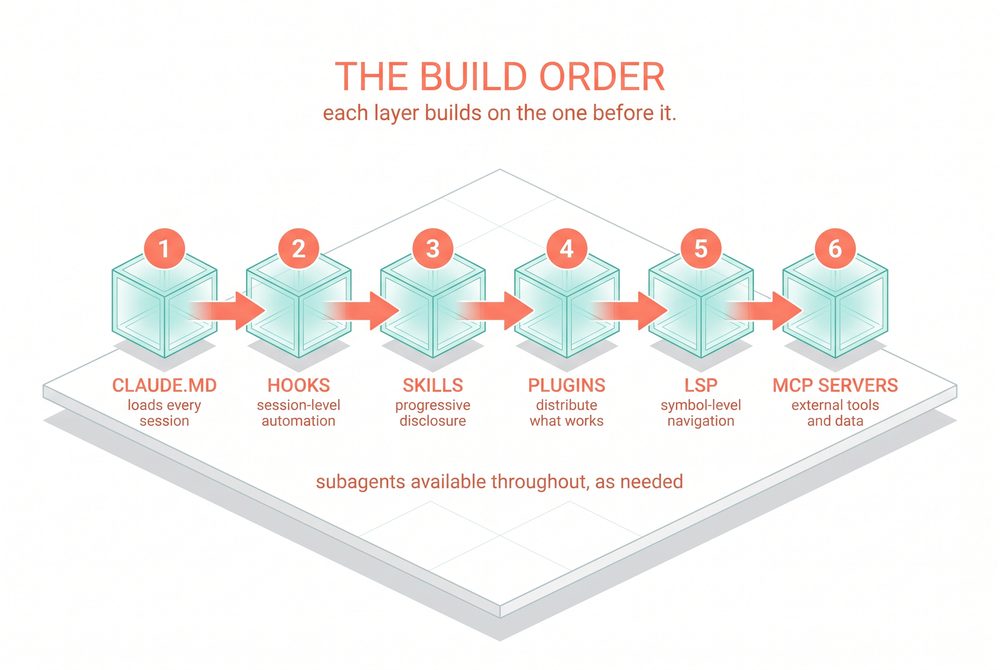
The build order is not advice about what to do first. It is a statement about what depends on what. Hooks need somewhere to read and propose updates against, which is CLAUDE.md. Skills become unmanageable without the reflection loop that hooks provide. Plugins need real skills to bundle, otherwise the marketplace fills up with empty packages. MCP servers are the most expensive layer to set up well and the most useless without the rest of the harness in place. Reverse the order and each step undermines the next.
Q&A
Quick quiz
Key takeaways
- The build order: CLAUDE.md, hooks, skills, plugins, LSP, MCP. Subagents anytime.
- Each layer requires the previous one to be solid.
- MCP-first teams fail by trying to integrate everything before the foundation works.
Three configuration patterns
The patterns that show up in every successful large-scale deployment, used as a checklist.
- How to make a codebase legible to Claude
- Why models evolving makes harness audits necessary
- The roles emerging in organizations that run Claude Code well
Make the codebase legible
- Layered CLAUDE.md files (root for big picture, subdirectories for local).
- Initialization in subdirectories rather than at the repo root.
- Test and lint commands scoped per directory.
.ignorefiles for generated content, build artifacts, third-party code.- Codebase maps when the directory structure does not do the work.
- LSP running so search happens at the symbol level.
Keep the harness current
Models evolve. Instructions written for the model you have today can work against the model you will have in six months. Audit after every major model release.
Assign ownership
Technical configuration alone does not drive adoption. The rollouts that spread fastest had a dedicated infrastructure investment before broad access. A small team, sometimes one person, wired up the tooling so Claude already fit developer workflows when they first touched it.
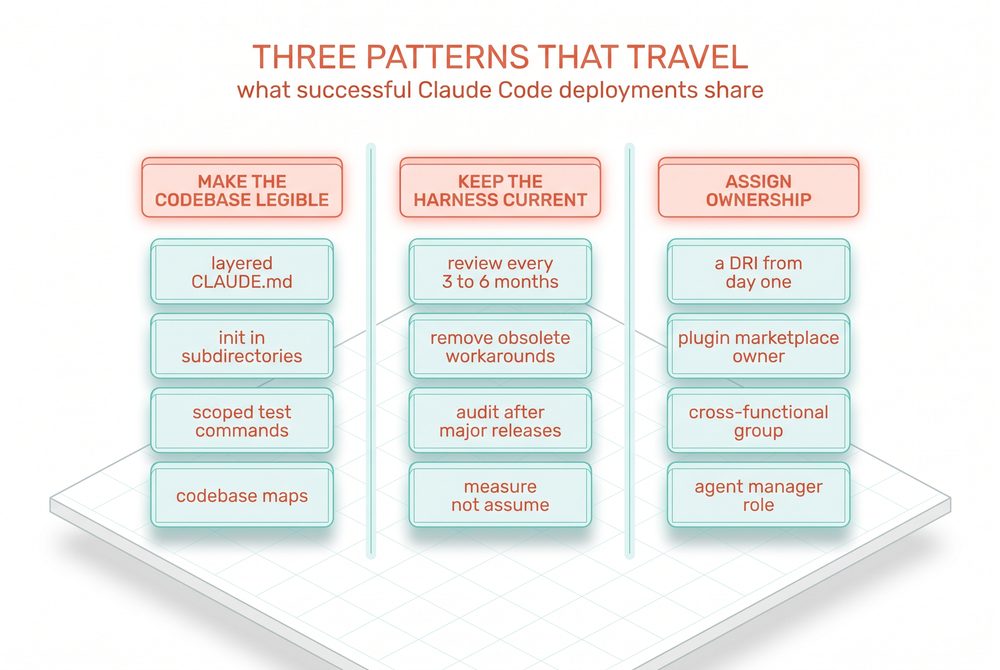
The three patterns work as a checklist because they cover the three failure modes that show up in every Claude Code rollout that stalls. Codebases that are not legible to Claude fail at the navigation layer no matter how much harness sits on top. Harnesses that are not kept current fail when models improve and old rules block work the new model could otherwise do. Configurations without owners fail because no single person has the authority to evolve them. Any one alone will eventually plateau a deployment.
Anthropic Cybersecurity (CLUE). Built "Claude Looks Up Evidence" with CLUE Triage (auto-disposition with confidence scores) and CLUE Investigate (NL queries via agentic loops). Built to PoC in one day, full implementation in one week. Results: 25 avg tool calls per investigation, false positives dropped 33% to 7%, an estimated 1,870 manual hours automated in 30 days.
Spotify. Up to 90% engineering time reduction on certain workflows. 650+ AI code changes shipped per month. Roughly half of all Spotify updates flow through the system.
Sources: claude.com/blog/how-anthropic-uses-claude-cybersecurity, claude.com/product/claude-code/enterprise
Q&A
Quick quiz
Key takeaways
- The three patterns: make legible, keep current, assign ownership.
- Audit the harness after every major model release, not just on the calendar.
- Name a DRI before you do anything else.
How specs flow into Claude Code
Where Track 1 and Track 3 meet. The .spec-cache pattern lives inside the Claude Code harness.
- How the workspace-spec workflow connects to the CLAUDE.md and skills layers
- Why the round-trip is best implemented as Claude Code primitives
- A worked example of the end-to-end flow
The two main tracks of this course are not independent. The Specs track describes where the spec lives (the workspace) and how it reaches the agent (the .spec-cache/ round-trip). The Harness track describes the six layers of the Claude Code harness. The spec workflow lives inside the harness.
Where the round-trip sits in the harness
The session-start pull is a start hook. The session-end sync-back is a stop hook. The agent's interaction with the cache is governed by CLAUDE.md conventions. The spec-pulling logic is bundled as a skill. The whole thing is distributed as part of a plugin. The workspace integration runs through an MCP server.
Five of the six harness layers are involved. That is not coincidence. The spec workflow is a Claude Code workflow, expressed through the harness primitives.
A worked example
- Developer opens a feature branch.
- Start hook fires: pulls the active spec from Notion via MCP into
.spec-cache/spec.md, loads the deployment skill for the relevant module. - Developer asks Claude to implement the feature. Claude reads the cache, follows references via LSP, writes code.
- Developer reviews. Surfaces a missing edge case. Claude updates the cache with the new requirement.
- Stop hook fires at session end: diffs the cache against Notion, syncs the new edge case back to the workspace. Cache is discarded.
- Developer opens a PR. A pre-commit hook freezes the final spec to
docs/specs/feature-shipped.md.
Six steps. Three hooks. Two skills. One MCP. The full harness, doing one piece of work.
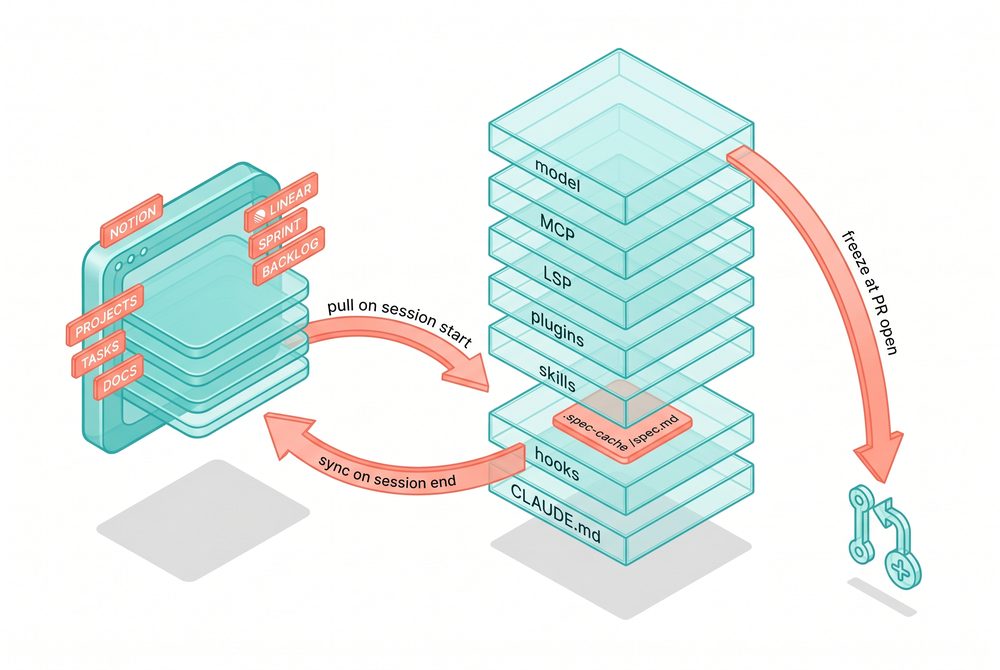
The line "five of the six harness layers are involved" matters because each layer involved is a place where the round-trip can fail silently. If the MCP server times out at session start, the start hook still completes, the cache stays empty, the agent improvises against whatever it can grep, and you do not find out until PR review. The hook layer, the skill layer, and the MCP layer each need an error mode that is loud rather than quiet, otherwise the architecture's clean diagram hides operational fragility behind it.
Q&A
Quick quiz
Key takeaways
- The spec workflow is implemented as Claude Code primitives: hooks, skills, plugin, MCP.
- Five of the six harness layers are involved in a single feature shipping round-trip.
- If you skip the harness work, the spec workflow has nowhere to live. If you skip the spec work, the harness has no useful target.
A 30-day adoption plan
How to roll both tracks out to a small team without breaking what already works.
- A week-by-week plan for adoption
- How to sequence the spec work and the harness work
- What to measure to know if it is working
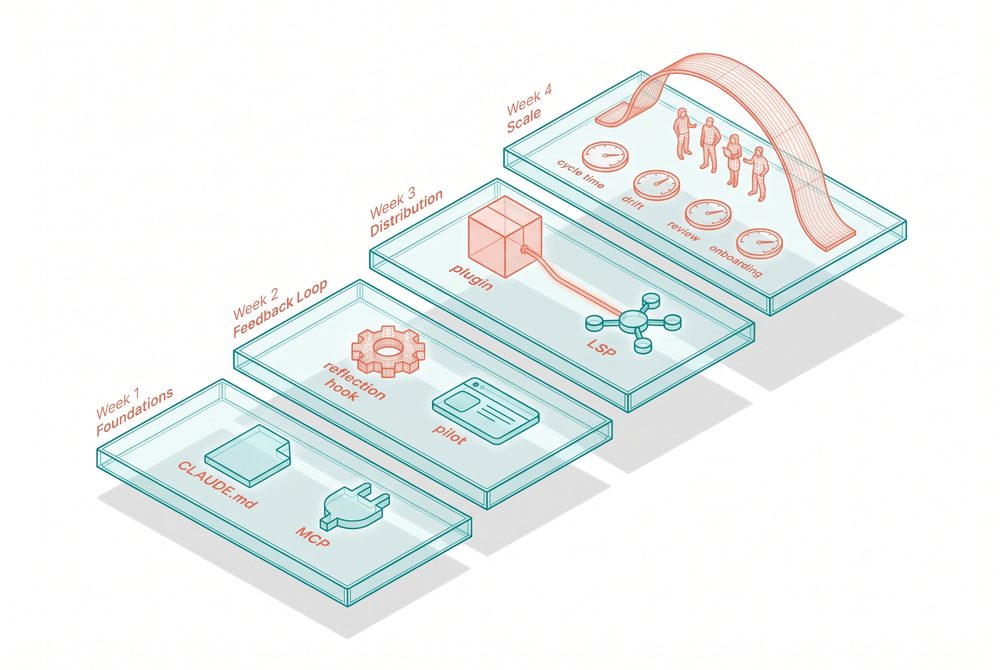
Week 1: foundations
- Inventory existing spec-shaped files in the repo.
- Audit the root CLAUDE.md. Aim for under 80 lines.
- Move task-specific patterns out of CLAUDE.md into individual skill files.
- Pick the workspace tool (Notion or Linear). Install its MCP server.
Week 2: feedback loop
- Install the reflection hook.
- Set up a weekly 15-minute review where the DRI looks at the reflection log.
- Pick one feature for the spec-workflow pilot.
Week 3: distribution
- Package the team's setup as a plugin.
- Set up a curated internal plugin marketplace if you do not have one.
- Wire up LSP for your primary language.
- Ship the pilot feature.
Week 4: scale
- Run a retro on the pilot.
- Roll the plugin out to the rest of the team.
- Schedule the first quarterly harness audit.
- Name the DRI if you have not already.
What to measure
- Cycle time per feature. Should drop.
- Spec-to-code drift. Should drop to near zero.
- Review burden. Should stay flat or drop.
- Onboarding time. Should drop dramatically.
The phrase "if cycle time does not drop, the harness is fighting the team" is doing real work but the lesson does not say what fighting looks like. Fighting means the developer is repeatedly correcting the agent on things the harness should already know, the same module-specific convention has to be retyped every session, the spec pulled into the cache contradicts a CLAUDE.md rule, or skills load context the developer then has to spend tokens overriding. The signal is qualitative before it is quantitative. If your senior engineers start saying "it would have been faster without it" in standup, you have your answer two weeks before the metrics confirm it.
Q&A
Quick quiz
Key takeaways
- Week 1: foundations. Week 2: feedback loop. Week 3: distribution. Week 4: scale.
- Four metrics to watch: cycle time, spec-to-code drift, review burden, onboarding time.
- Four weeks is enough to know if it works.
When integration breaks
The spec workflow and the harness are independently good designs that fail in specific, predictable ways when they meet. Here is how to tell which half is at fault.
- The four most common integration failures and their signatures
- The diagnostic question for any of them ("which side moved last?")
- How to make silent failures loud
Most teams will hit at least two of these in the first month. Knowing which half is at fault is what lets you fix the right thing instead of rebuilding both.
Failure 1: looks like a model regression
A developer says the agent used to follow the spec carefully and now it ignores half of it. Nine times out of ten, the spec is fine and the harness changed. Someone added 400 lines to CLAUDE.md, a new skill is loading context that contradicts the spec, or a plugin update changed the order things load in. The fix lives in the harness.
Failure 2: looks like a harness bug
The cache is being pulled correctly, CLAUDE.md is lean, hooks are firing, and yet the output is still off. If three different developers all produce three different interpretations of the same spec, the spec is ambiguous. The harness cannot fix that.
The diagnostic: when the harness is the problem, output varies by developer based on environment. When the spec is the problem, output varies by interpretation regardless of environment.
Failure 3: silent cache staleness
The start hook ran, wrote a file to .spec-cache/spec.md, and returned success, but the MCP call inside it failed silently and the cache has yesterday's content. The developer trusts the cache because the hook said it succeeded.
The fix is making the start hook noisy on partial failure. If the MCP call returns less than expected, the hook should fail visibly rather than write an old or empty file.
Failure 4: workspace pollution
Refinements that should have been comments or follow-up tickets get synced back as edits to the spec itself. Over time the spec accretes session-specific noise that nobody reviews. The stop hook needs a filter.
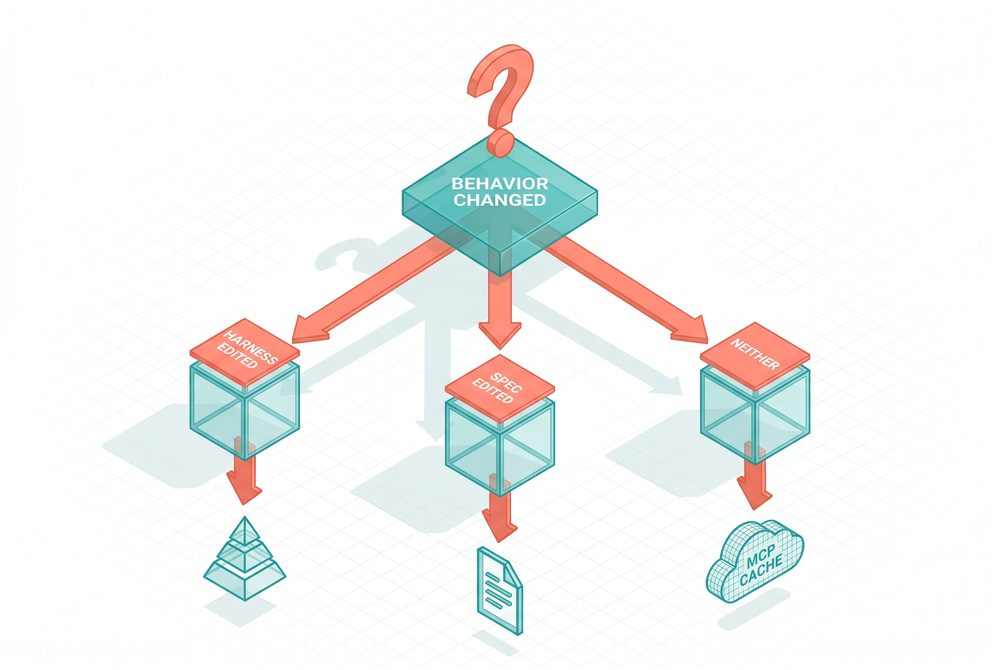
The thread connecting all four failure modes is the same one: the architecture is clean on paper and silently fragile in practice. Each transition between layers (workspace to cache, cache to agent, agent to PR snapshot) is a place where success-without-substance can occur. The discipline is making every transition loud about partial failure. A start hook that wrote an empty file is not success. A stop hook that synced nothing meaningful is not success. A frozen snapshot that lost half its content is not success. The audit job is to find each transition that can silently succeed-but-fail and instrument it.
Q&A
Quick quiz
Key takeaways
- Four common integration failures: model regression illusion, harness blame illusion, silent cache staleness, workspace pollution.
- Diagnostic question: which side moved last?
- Make every layer transition loud about partial failure.
Onboarding a new engineer
A sequenced day that gives them a working setup, a real task, and a frozen snapshot of their first PR by 5pm.
- The four phases of a one-day onboarding
- Why the day ends with a real PR, not a sandbox exercise
- How onboarding retros surface harness improvements
Hour one: install the plugin
The team plugin bundles the root CLAUDE.md, the start and stop hooks, the spec skill, the MCP configuration, and any team-specific skills. If the plugin is well-built, this step is a single command and produces a working environment without the new engineer needing to understand any of the layers yet. If it takes longer than 30 minutes, the plugin is not yet at the standard the team needs.
Hour two: the walkthrough
The DRI or a peer walks through one ticket end to end. Open the workspace, show the spec. Open Claude Code, show the start hook firing, show the cache file appearing. Make one small change, show the stop hook running, show the diff that goes back. Open a draft PR, show the frozen snapshot.
Afternoon: the small real task
Give the new engineer a ticket that is well-specified, bounded, and genuinely useful. Not a fake onboarding task. They author or co-author the spec in the workspace, run the round-trip themselves, and open a PR. The DRI reviews with onboarding context in mind.
End of day: the retro
Fifteen minutes. What was confusing, what was obvious, what did the new engineer expect that did not happen. Every onboarding retro should produce at least one CLAUDE.md update, one skill clarification, or one plugin fix. If three onboardings in a row produce no actionable feedback, the team has stopped paying attention.
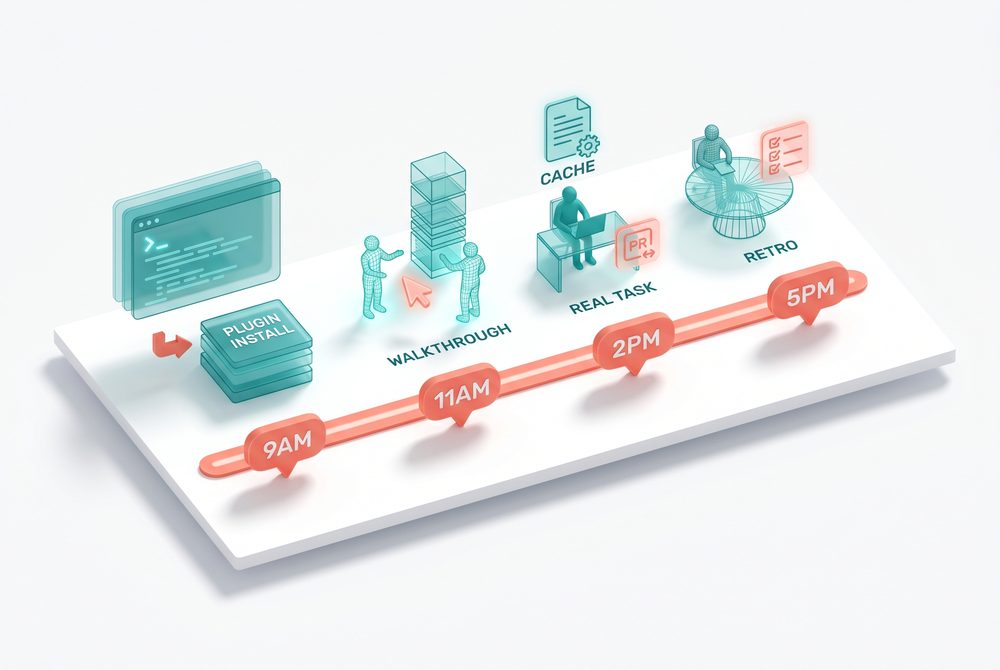
The onboarding day is the highest-signal QA pass your harness ever gets. A returning engineer has accommodated to the rough edges. A new engineer has not. Every assumption the harness implicitly makes about prior knowledge surfaces in the first hours of their first day. The retro at 5pm captures those surfaces in their freshest form, before the new engineer has built workarounds. Treat the retro as the audit, not the formality.
Q&A
Quick quiz
Key takeaways
- Four phases in one day: install, walkthrough, real task, retro.
- Real PR not sandbox. The round-trip only proves itself under real conditions.
- Every onboarding retro produces at least one harness improvement.
Why spec-driven development exists
The cost of ambiguity changed when an LLM started doing the typing. Specs went from helpful hints to load-bearing constraints.
- Why spec-driven development emerged as a discipline in the AI era
- The asymmetry between human and agent responses to vague instructions
- When spec-driven development pays off and when it does not
Spec-driven development is old. Waterfall had specs. BDD (Gherkin) had specs. OpenAPI has specs. Every era of software has had some version of "write down what you want before you build it."
What changed in 2025-2026 is that the spec became the input to a builder that does not understand intent.
The asymmetry
A human engineer reading a vague spec pauses, asks a colleague, slows down. An LLM agent reading a vague spec produces plausible output. By the time the human reviews it, hours of execution and hundreds of lines of code are already committed.
When it pays off
SDD is right for the chunky-but-bounded work in the middle. The sweet spot is "a real feature, well-defined, that an agent will execute for one to four hours and produce a PR you will review."
When it does not
- Small fixes. "Change the button color to teal" does not need a spec.
- Weekend prototypes. Specs slow exploration.
- Throwaway scripts. A 40-line transformation does not need a spec.
- Tasks where you do not know what you want yet. Writing a spec before knowing is procrastination dressed as discipline.
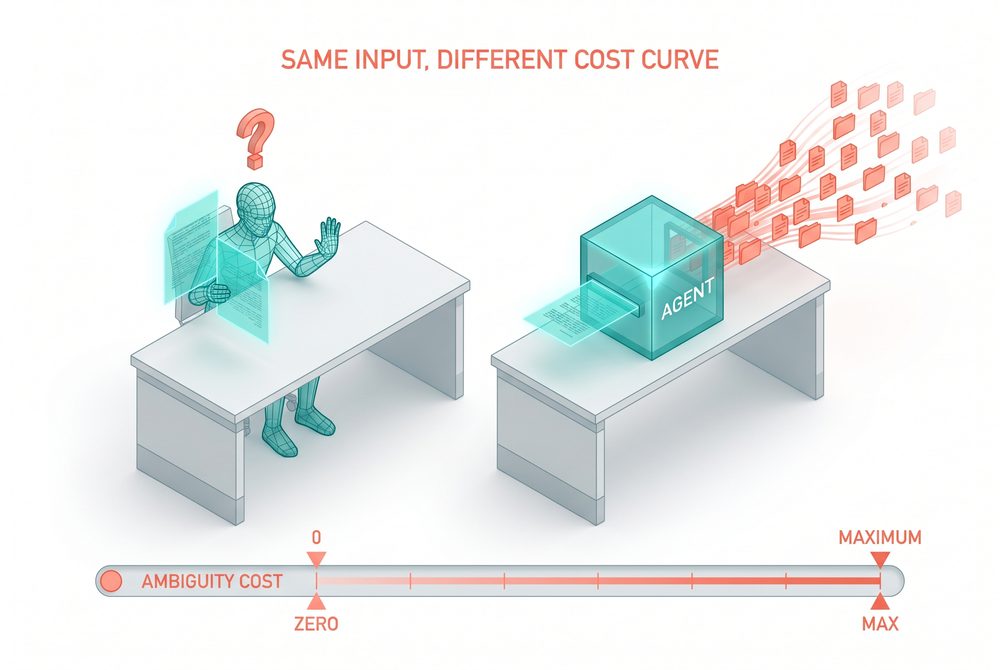
The asymmetry between humans and agents on vague input is not just about diligence, it is about cost structure. When a human reads an unclear requirement, the cost of pausing is a Slack message and ten minutes; the cost of guessing is hours of rework. So humans pause. When an agent reads an unclear requirement, the cost of pausing is roughly the same as the cost of guessing, both happen at machine speed. There is no economic pressure to clarify, so the agent does what it is optimized to do, which is generate plausible output. The spec is not a discipline tool, it is a way to manually inject the pause that the agent's cost structure removed.
Q&A
Quick quiz
Key takeaways
- Specs are old. What is new is using them as input to an LLM that does not understand intent.
- Ambiguity in agent coding actively creates risk; the spec pre-pays that cost.
- SDD pays off for chunky-but-bounded work. Small fixes and pure exploration do not need it.
The spec.md problem
Why every team that adopted spec.md hits the same wall at week six.
- The drift pattern that appears in nearly every spec.md deployment
- Why three sources of truth predictably end up in Slack reconciliation
- The root cause: no precedence rule between artifacts
Three engineering teams in March and April adopted spec-driven development the same way. spec.md in the repo, agent reads the file, work happens, file gets updated. All three loved it for three weeks. All three hit the same wall in week six.
Nobody decided this should happen. It happened anyway, because the file and the ticket were both being treated as the truth, and they drifted.
Three sources, no precedence rule
- The file was authoritative for the agent.
- The Linear ticket was authoritative for status.
- The Slack thread was authoritative for the why.
Three sources, no precedence rule, predictable result.
The flat-file critique
A flat markdown file is bad at five things a spec has: status, ownership, dependencies, audit history, and connections. The file is a snapshot pretending to be a system of record.
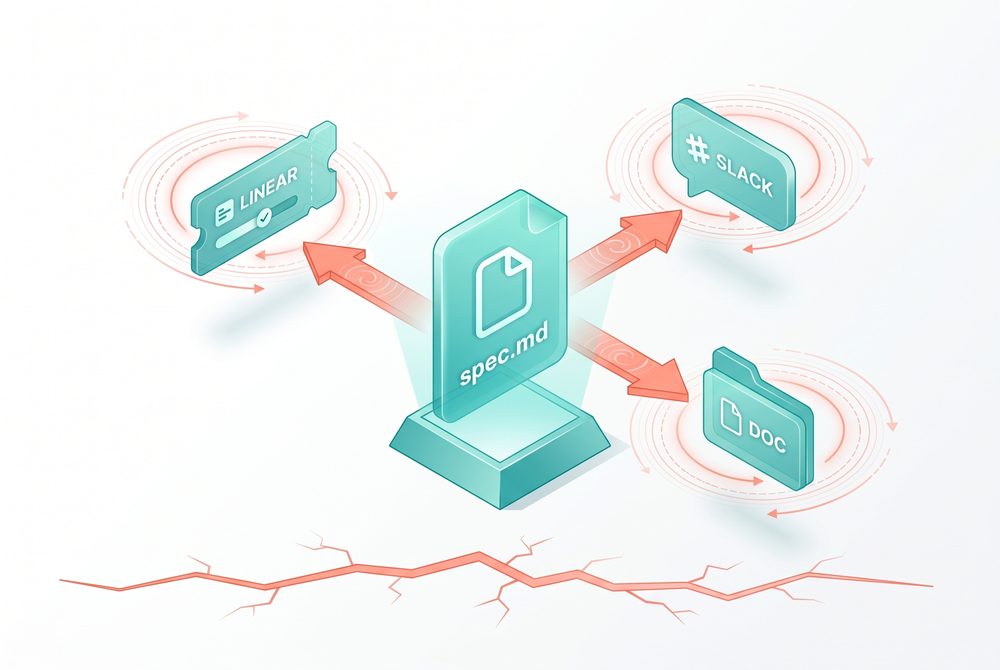
The reconciliation system that emerges around spec.md is invisible because nobody schedules it. Engineers reconcile in Slack threads, in standup, in PR comments, in passing conversations at the coffee machine. None of those count as work in the tracker, none have an owner, and none produce an artifact. The team is paying a tax that does not show up in any process diagram. The diagnostic is simple: if you cannot point to the one place where the current state of a feature is recorded, you are running reconciliation, you just have not named it.
Q&A
Quick quiz
Key takeaways
- Every team that puts spec.md in the repo as source of truth drifts within six weeks.
- The drift is structural: no precedence rule between artifacts.
- A flat file is bad at status, ownership, dependencies, history, and connections.
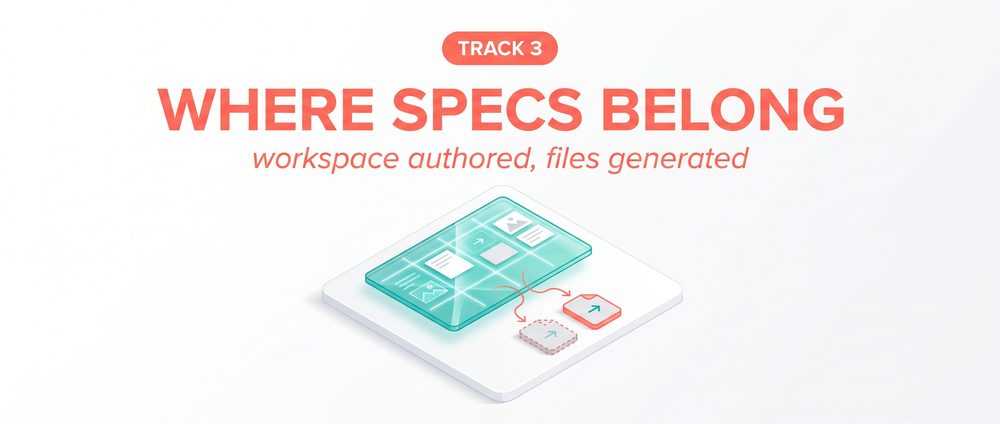
Workspace authored, files generated
The one-sentence rule that resolves the spec.md drift problem cleanly.
- Why the file is not the problem; treating it as authored is
- How Notion's May 13 platform launch changes the calculus
- The framing that responds to the Marmelab Waterfall critique
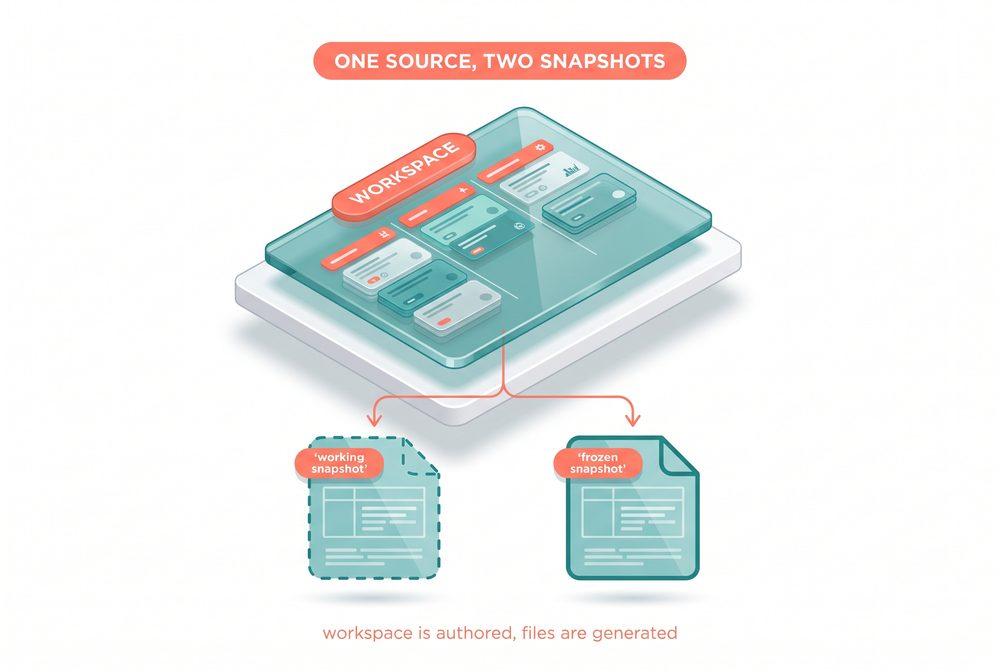
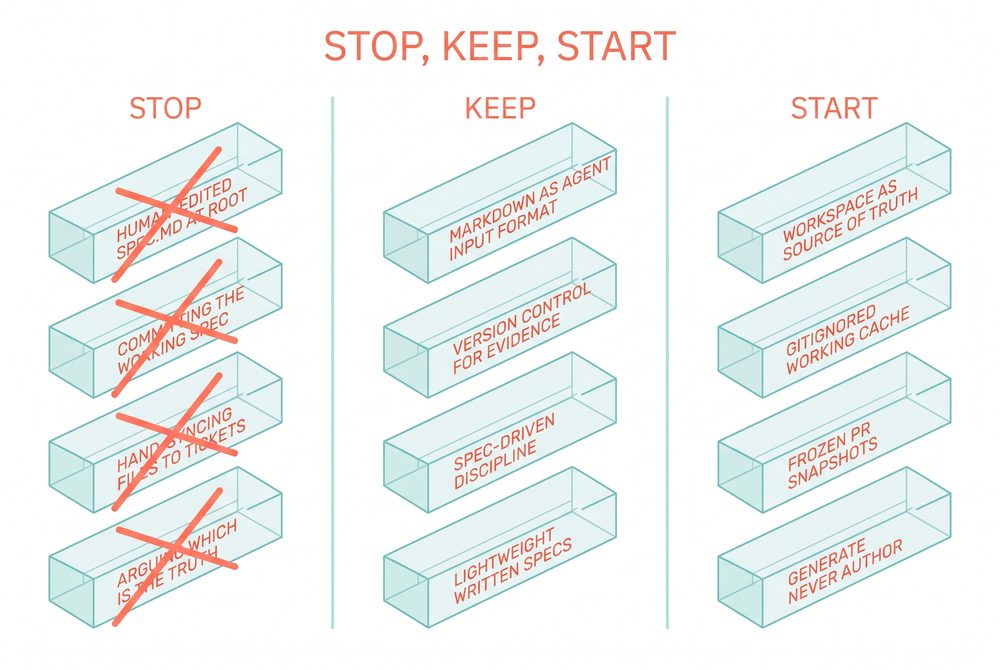
The fix is not to delete the file. The fix is to make sure the file got generated, not typed.
The spec lives in Notion (or Linear). The repo holds two kinds of generated snapshot, never an authored file.
Why Notion specifically
The case got a lot stronger on May 13 2026 when Notion launched their Developer Platform. CEO Ivan Zhao: "Use your Notion database as a sheer canvas to power both your workflows and your agents." First-class integrations with Claude Code, Cursor, Codex, Decagon.
What changes when you move the spec to a workspace
- The spec has a status (draft, in review, approved, in progress, done).
- The spec has an owner (named human responsible).
- The spec has dependencies (this blocks that).
- The spec has audit history (not git blame, the real record).
- The spec connects to bugs, designs, customer issues.
Response to the Marmelab critique
Marmelab's "Waterfall strikes back" piece argues big design up front fails. The workspace-authored, files-generated pattern is not Waterfall. The workspace evolves continuously. What freezes is the snapshot at PR open, which is just evidence of what shipped.
The fix sounds like a tooling change, but it is a contract change. Authored files carry an implicit promise that they reflect current intent. The instant a developer can edit a file with their hands and commit it, the file starts accumulating drift, because every edit is a vote against the workspace being the source of truth. Generated files break the contract loudly, you cannot edit them with confidence, the next regeneration will overwrite you, so you stop trying. The discipline becomes mechanical rather than cultural, which is why this pattern survives turnover.
Q&A
Quick quiz
Key takeaways
- The fix is making the file generated rather than typed, not deleting it.
- Notion positioned for the spec-source-of-truth slot on May 13 2026.
- The pattern is not Waterfall because the workspace evolves continuously.
The three-tier architecture
Three artifacts with different homes, different mutability, and three different audiences.
- The role of each tier (source of truth, working snapshot, frozen snapshot)
- Why three tiers exist instead of one
- How to know which tier a given file belongs in
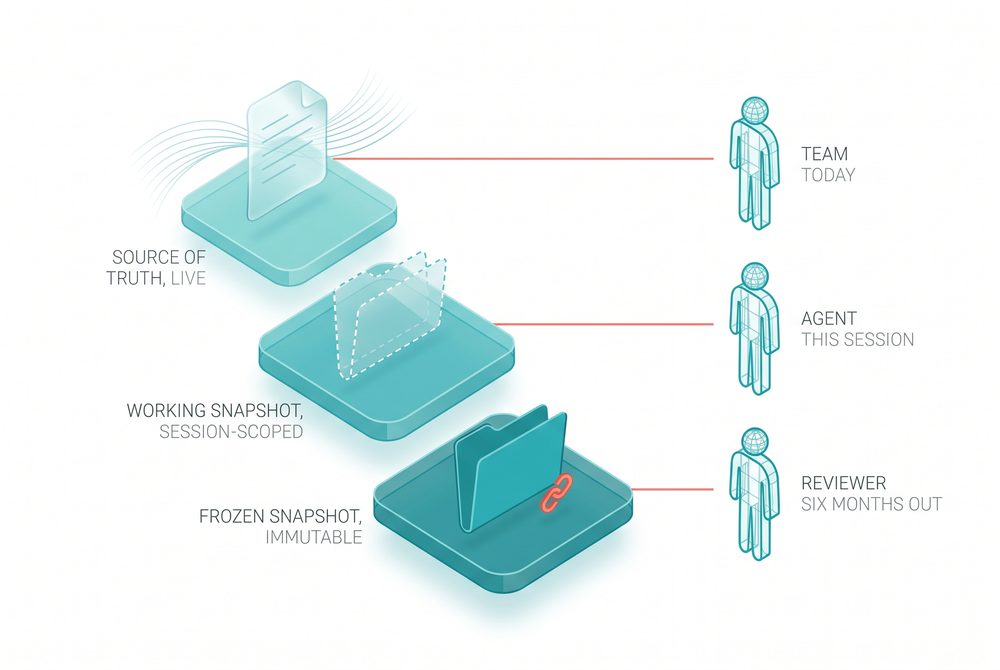
Tier 1: source of truth
Authored in Notion or Linear. Continuously evolving. Read by humans and by agents through MCP.
Tier 2: working snapshot
Lives in .spec-cache/spec.md. Gitignored. Pulled at session start. Regenerated next session. Never committed.
Tier 3: frozen snapshot
Lives in docs/specs/<feature>-shipped.md. Committed alongside the PR. Frozen at PR open.
Working snapshot: what is the agent looking at right now?
Frozen snapshot: what spec was true when this code shipped?
A single file at the root of your repo cannot be all three things at once.
How to know which tier a file is in
If a file got typed by a human and committed to git, it is in the wrong tier. The rule: generate, never author.
Try it: which tier?
.spec-cache/spec.md regenerated at session start
docs/specs/payments-shipped.md attached to PR #1247
Three tiers exist because three different audiences ask three different questions, and the answers have different lifetimes. The team currently asks "what should this feature be." The agent in this session asks "what am I building right now." The reviewer six months from now asks "what was true when this shipped." Collapsing those into one file forces the file to be live and frozen at the same time, which is impossible.
Q&A
Quick quiz
Key takeaways
- Source of truth in workspace, working snapshot in gitignored cache, frozen snapshot committed alongside PR.
- Each tier answers a different question. One file cannot answer all three.
- If a human typed it and committed it, it is in the wrong tier.
The .spec-cache round-trip
The actual workflow that wires the three tiers together. Five steps, no ambiguity.
- The five-stage workflow from session start to PR landing
- How the cache gets discarded without losing changes
- Why this pattern cannot drift
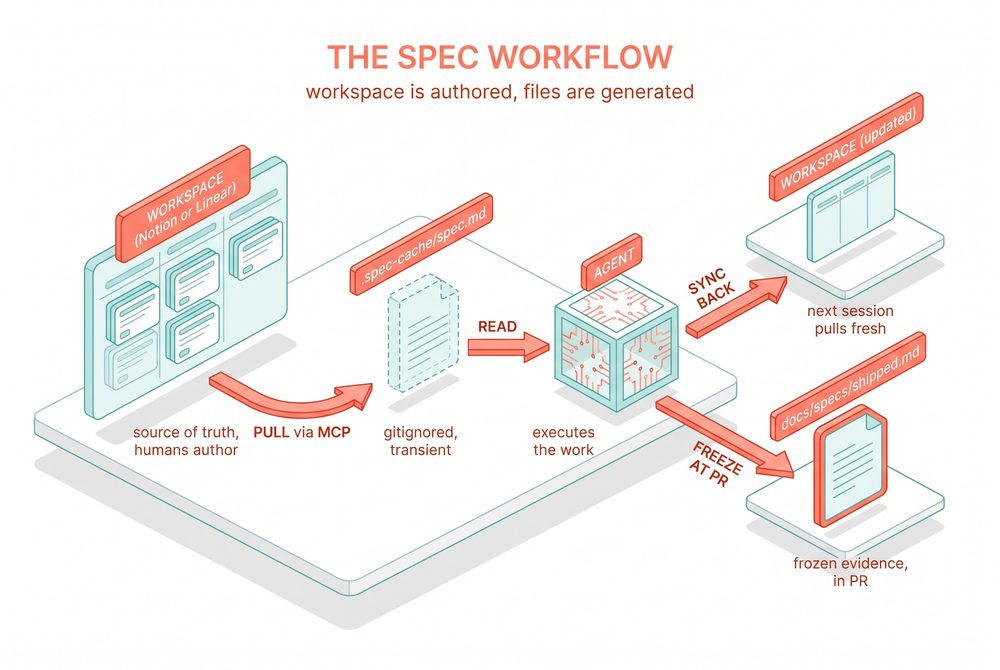
Session start
Pull the current spec from Notion or Linear via MCP. Write it to .spec-cache/spec.md (gitignored).
During the session
The agent reads from the cache. The agent may also write to the cache as work surfaces new requirements. Behaves exactly like the spec.md you are used to, with one difference: nobody else is editing this file. It is yours for this session.
Session end
Diff the cache against the workspace. Sync meaningful changes back. The workspace updates. The cache gets discarded.
At PR open
Generate a frozen snapshot of the spec. Commit it to docs/specs/<feature>-shipped.md.
The reason this pattern cannot drift is that drift requires two artifacts to be treated as authoritative at the same time. In the round-trip, the cache is explicitly not authoritative, it is a session-scoped working copy, and everyone on the team knows it. The frozen snapshot is explicitly not authoritative either, it is historical evidence. Only the workspace ever holds the role of source of truth, and there is only one workspace. The architecture moves the team from "which artifact is right" to "what does the workspace say right now," which is a question with exactly one answer.
Q&A
Quick quiz
Key takeaways
- Pull on session start, sync back on session end, freeze at PR open.
- The cache is gitignored and discarded. The frozen snapshot is committed and frozen.
- Wrap the round-trip as a slash command or skill.
What to do this week
Three concrete moves for any team running the older pattern, in priority order.
- How to inventory your existing spec-shaped files
- Which MCP server to install first
- How to run a one-feature pilot of the new pattern
Day 1: run the inventory
List every markdown file that contains spec-shaped content. spec.md, LDD.md, tickets.md, requirements.md, design.md. For each, ask: is this also tracked in Notion or Linear? If yes, decide which is authoritative.
Day 2: install the MCP server
Notion MCP is hosted and works with Claude Code, Cursor, VS Code, ChatGPT. Linear MCP is mature. Pick whichever workspace your team uses.
Day 3: pick one feature for the pilot
Run it through the new pattern end to end. Author the spec in the workspace, pull to .spec-cache/, work the feature, sync back, freeze at PR open. The team will know within two weeks whether the architecture is better.
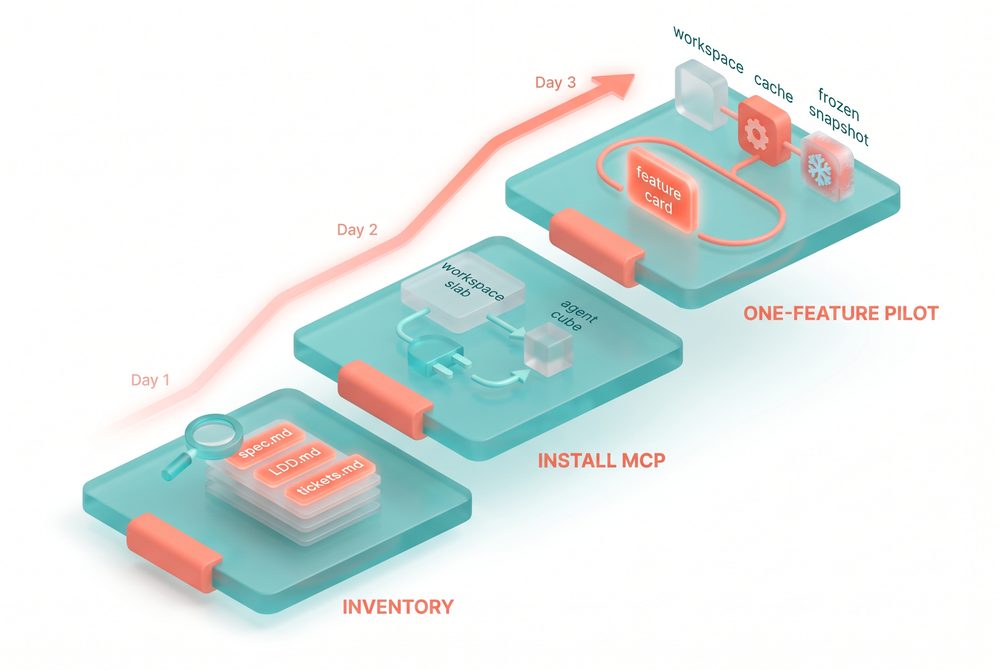
The inventory step usually surfaces more spec-shaped files than teams expect, because the original spec.md spawned siblings as the team tried to patch around its limitations. There is the LDD that captures the design that did not fit in spec.md, the tickets.md that tracks state because spec.md cannot, the requirements.md that froze a moment in time because spec.md kept changing. When you do the inventory, you are not just counting files, you are reading a history of which workspace capability was missing on which day.
Q&A
Quick quiz
Key takeaways
- Day 1: inventory. Day 2: MCP. Day 3: one-feature pilot.
- Pick the workspace your team already uses.
- Two weeks is enough time to know if the pattern is working.
Source articles & further reading
The long-form articles and Anthropic docs the course was curated from.
Track 1: the Claude Code harness
- How Claude Code works in large codebases. Anthropic, May 14 2026. The source article for the whole track.
- Best practices for Claude Code. code.claude.com/docs/en/best-practices. The official patterns and failure modes.
- Hooks documentation. code.claude.com/docs/en/hooks. The six events, exit code semantics, deterministic guarantees.
- Skills documentation. code.claude.com/docs/en/skills. Frontmatter fields, lifecycle, the 5K/25K compaction budget.
- Plugins documentation. code.claude.com/docs/en/plugins. Manifest, layout, marketplaces, security restrictions.
- MCP documentation. code.claude.com/docs/en/mcp. Transports, scopes, reconnection, channels.
- Subagents documentation. code.claude.com/docs/en/sub-agents. Built-in agents, scopes, memory, isolation.
- Permissions documentation. code.claude.com/docs/en/permissions. Deny-ask-allow order, wildcards, path anchors.
Track 2: case studies and adjacent material
- How Anthropic Uses Claude for Cybersecurity. claude.com/blog/how-anthropic-uses-claude-cybersecurity. The CLUE deployment, 33% to 7% false positive reduction.
- Agent View in Claude Code. claude.com/blog/agent-view-in-claude-code. The agents dashboard and parallel session management.
- Claude Code Desktop Redesign. claude.com/blog/claude-code-desktop-redesign. Sidebar of sessions, side chat, integrated terminal.
- Enterprise customer numbers. claude.com/product/claude-code/enterprise. Rakuten 79% faster, Stripe 10K-line migration in 4 days, Wiz 50K-line in 20 hours.
Track 3: where specs belong
- Spec-Driven Development Is Right. Spec.md Is the Wrong Container. Marco, Autocomplete on Medium, May 18 2026.
- Workspace Is Authored. Files Are Generated. Marco, Autocomplete on Medium, May 21 2026.
- Spec-driven development: The AI engineering workflow at Notion. Ryan Nystrom, Lenny's Newsletter.
- Spec-Driven Development: The Waterfall Strikes Back. Marmelab, November 2025. The strongest published dissent, worth steel-manning.
- Notion Developer Platform launch. May 13 2026. The vendor positioning that crystallized the case.
Bonus: adjacent material from the Autocomplete archive
- The DESIGN.md Definitive Guide.
- Skills, MCP, and Tools: The Three-Layer Model.
- Prompt Engineering in 2026: Assistant vs Agent.
- The Mac Mini Production Inference Tutorial.
About this course
This course was assembled in May 2026 from the Autocomplete publication and from Anthropic's May 14 2026 Claude Code guide plus the official docs. It will evolve as the underlying material does.
Spotted an error or have feedback? Reply to any Autocomplete Substack issue. Marco reads everything.
To delete your local progress and start fresh: open browser dev tools, run localStorage.removeItem('course-progress') in the console, refresh the page.